skip to main content
 How to Arrange a Small Office Space for Peak Productivity
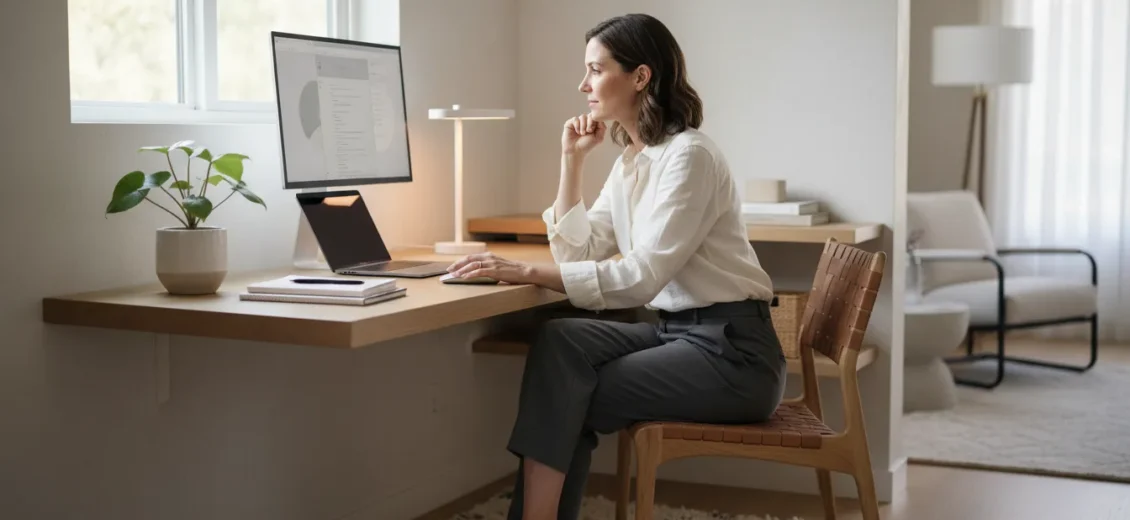

Table of Contents
- Introduction
- The Foundation of Small Office Layouts
- Maximizing the Vertical Dimension
- Furniture Strategy for Limited Footprints
- Lighting and the Perception of Space
- Managing the “Invisible” Clutter: Cables and Digital Files
- The Operational Support Layer: Beyond the Physical Layout
- Fostering Connection in a Compact Space
- Transitioning from Home to a Professional Suite
- Planning for Growth: A Realistic Scenario
- Strategic Tips for Small Office Success
- Conclusion
- FAQ
Introduction
Have you ever walked into your workspace and felt an immediate sense of “spatial claustrophobia”? It is that specific frustration when your desk is overflowing, your cables are a tangled web beneath your feet, and the walls seem to be closing in just as your to-do list is expanding. For many founders, consultants, and small teams, the challenge of a limited footprint is a daily reality. However, the size of your office does not have to dictate the scale of your success.
The purpose of this guide is to provide a detailed, strategic approach to arranging a small office space that prioritizes both functionality and professional growth. We will explore how to anchor your layout, utilize vertical space, and leverage professional environments to overcome the limitations of a compact room. Whether you are moving into a new private suite or optimizing a corner of a larger room, the way you arrange your physical environment directly impacts your focus and operational efficiency. At Workbox, we believe in “Workspace with a Purpose,” and that begins with a layout designed for Member Success.
Ultimately, the goal is to transform a cramped area into a streamlined headquarters where the operational burden is minimized, and your focus remains entirely on your business goals.
The Foundation of Small Office Layouts
The most critical step in arranging any small space is identifying the “anchor.” In an office, the desk is your primary tool and should be the first piece of furniture you place. Every other element in the room should support the functionality of this central workstation.
Start with the Longest Wall
In a compact room, placing the desk against the longest open wall is often the most efficient use of square footage. This keeps the center of the room open, allowing for better traffic flow and a sense of “breathing room.” If your office has a window, consider placing your desk at a right angle to it. This provides the benefit of natural light while minimizing glare on your screen, which can lead to eye strain during long working hours.
The Power of Corner Placement
If the longest wall is interrupted by doors or radiators, a corner arrangement is the next best option. An L-shaped configuration or a desk tucked into a corner utilizes “dead space” that often goes to waste. This arrangement also creates a natural sense of privacy, even in an open environment, allowing you to create a mental boundary between your work zone and the rest of the room.
Clear the Floor Path
Nothing makes a small office feel smaller than a blocked doorway or a cramped walkway. Ensure that there is a clear path from the door to your desk. Industry standards suggest leaving at least 30 to 36 inches of clearance for walkways. If your chair is pushed back, there should still be enough room for someone to pass behind you without you needing to tuck yourself in.
Maximizing the Vertical Dimension
When you run out of floor space, the only way to go is up. Vertical organization is the secret weapon of high-performance small offices. It allows you to keep essential tools within reach without cluttering your primary work surface.
Floating Shelves and Wall Systems
Instead of bulky bookcases that take up valuable floor area, install floating shelves. Use the space above your desk for items you need daily—notebooks, reference manuals, or a small clock. Higher shelves can be used for long-term storage or decorative elements that personalize the space without interfering with your workflow. At Workbox, we understand that professional presence matters, which is why we include company logo placement on the office door for our private office members at no additional cost. This establishes your brand vertically before a client even enters the room.
Pegboards and Grid Organizers
For creative professionals or those who deal with physical tools, a wall-mounted pegboard is a versatile solution. It keeps scissors, chargers, headphones, and tablets off your desk while keeping them visible and accessible. This “visual inventory” prevents the time-wasting hunt for supplies at the bottom of a drawer.
High-Level Storage for Archives
For documents or supplies you only need once a quarter, use the space near the ceiling. Closed storage boxes on a high shelf keep the room looking clean and professional. In a professional suite environment, the goal is a “reset-ready” workspace where everything has a designated home, reducing the mental fatigue that comes with visual clutter.
Furniture Strategy for Limited Footprints
In a small office, every piece of furniture must earn its place. Traditional, heavy executive desks often overwhelm a small room. Instead, look for pieces that offer high functionality with a light visual profile.
Multi-Functional and Mobile Units
Consider a rolling drawer unit that can fit under your desk when not in use. This provides storage for pens, paper, and files without requiring extra floor space. If you occasionally need to spread out for a project, a small folding table or a mobile “caddy” can provide temporary surface area and then be tucked away.
Choosing the Right Chair
While the desk is the anchor, your chair is the most used tool in the room. Select a chair that can tuck fully under the desk when you leave for the day. This keeps the walkways clear and makes the room feel much larger during non-working hours. Our private offices and suites come with furnished desks and chairs, ensuring you have a professional setup from day one without the logistical headache of ordering and assembling furniture.
Technology and Hardware Placement
Large printers and bulky desktop towers can quickly consume a small office. Whenever possible, move these off the desk. A dedicated printer stand or a shelf can house these items. In a professional coworking environment like ours, members enjoy access to unlimited printing as part of their membership, which often eliminates the need for bulky hardware within their private office altogether. This is part of the operational support that helps reduce the administrative burden of running your own office.
Lighting and the Perception of Space
The way a room is lit can significantly change how large it feels. A poorly lit office feels dingy and cramped, while a bright, well-balanced room feels expansive and energizing.
Layering Your Light Sources
Do not rely solely on overhead fluorescent lighting. Layering your light involves three types:
- Ambient Light: The general overhead light or natural light from windows.
- Task Light: A high-quality desk lamp that illuminates your immediate work area.
- Accent Light: Small lamps or LED strips on shelves that add depth to the room.
Mirrors and Reflective Surfaces
It may seem like a design trick, but strategically placing a mirror can double the perceived depth of a small office. Position a mirror opposite a window or a door to reflect light and views. Even glass-fronted cabinets or polished metal accents can help bounce light around the room, making a 100-square-foot office feel significantly larger.
Color Palettes for Growth
While dark colors can feel cozy, they tend to absorb light and make walls feel closer. To maximize the feel of a small space, stick to light neutrals like off-white, soft grays, or light blues. These colors provide a clean, professional backdrop that allows your work—and your brand—to stand out.
Managing the “Invisible” Clutter: Cables and Digital Files
In a small office, one of the biggest space-stealers is cable clutter. A “spaghetti” pile of wires under your desk not only looks unprofessional but also makes cleaning difficult and creates a tripping hazard.
Under-Desk Cable Management
Use cable trays, zip ties, or Velcro wraps to bundle cords and run them along the underside of your desk or down the legs. Keeping cables off the floor makes the entire room look more organized instantly. At Workbox, we provide fast, secure Wi-Fi and Ethernet, ensuring that your connectivity is seamless and your “cord footprint” is as small as possible.
The Paperless Shift
Physical paper is the primary cause of clutter in small offices. Transitioning to a digital filing system can eliminate the need for heavy filing cabinets. Use cloud storage for your archives and a high-quality scanner for incoming mail.
For members who need to handle physical mail but want to keep their desks clear, we offer mailing and packaging services for Floating Memberships and higher. This allows you to maintain a professional business address without having to manage the daily logistics of mail sorting in your private space.
The Operational Support Layer: Beyond the Physical Layout
Arranging a small office is not just about where the desk goes; it is about how the office functions. Many professionals find that they spend 20% of their time managing the space rather than doing their work. This is where the concept of “Operational Support” becomes a game-changer.
Reducing the Administrative Burden
When you manage a traditional small office, you are responsible for everything: internet setup, janitorial services, utilities, furniture procurement, and lease negotiations. These tasks take up mental space and physical time. By choosing a bundled workplace environment like Workbox, you bypass these hurdles. We provide the operational backbone—handling the cleaning, the Wi-Fi, and the utilities—so you can walk into a perfectly arranged space and start working immediately.
Scalable Real Estate
A common challenge with small offices is what happens when you grow. In a traditional lease, you might be locked into a 5-year agreement for a space you will outgrow in six months. We offer a more flexible model, with Private Offices and Suites starting at $500/mo (varying by location). This allows a small team to start in a single office and move into a larger suite as they hire, all while staying within the same professional community.
Professionalism on Demand
A small office might be perfect for deep work, but it may not be the ideal place to host a high-stakes board meeting or a 20-person workshop. This is where the “enabling layer” of a professional coworking space provides the ultimate flexibility. For a consultant juggling client meetings and deep work, reserving a professional meeting room—starting at $60/hr—provides a high-end experience for guests that their private small office might not accommodate.
Fostering Connection in a Compact Space
One of the risks of working in a small, private office is isolation. While focus is important, professional growth often happens in the spaces between tasks.
Member Connection and Community
A well-arranged office should be a place where you can focus, but it should not be a bunker. At Workbox, our Member Success philosophy is built on the idea that high-quality member-to-member interactions drive business growth. Even if your private office is small, you have access to a broader network of leaders, innovators, and investors.
Our spaces are designed to facilitate these connections through:
- Weekly Community Engagements: Regular opportunities to step out of your office and meet other members.
- Quarterly Mixers: Larger events designed for deeper networking and business development.
- Common Areas: Lounges and cafes where serendipitous introductions happen over complimentary coffee and tea.
For a small team transitioning out of a home office or a coffee shop, a private office gives them consistency and privacy for calls while staying connected to a nationwide network of professionals. Members can also explore upcoming Workbox events and community gatherings to find additional opportunities for connection.
Transitioning from Home to a Professional Suite
Many professionals start their journey by arranging a small office in a spare bedroom or a basement. While this works for the early stages, there is a distinct shift in mindset and productivity when moving into a dedicated professional environment.
The “Home Base” Advantage
Nearly two-thirds of our member companies choose Workbox as their corporate headquarters. Having a dedicated professional address—not a home address—is crucial for credibility. It changes how you are perceived by clients, partners, and potential investors.
Separation of Work and Life
When your office is at home, “arranging” the space often involves compromising with household needs. In a dedicated suite, the arrangement is 100% focused on your business. This physical separation helps in maintaining healthy work boundaries, ensuring that when you are in your office, you are 100% “on.”
Access to Specialized Resources
Arranging a small office in a Workbox location also gives you access to the Business Development layer. This includes resources like vendor discounts, cloud credits, and programming with business leaders and capital partners. These are tools that no amount of clever desk-placing in a home office can provide.
Planning for Growth: A Realistic Scenario
Consider the journey of a growing startup. Initially, the founder might use a Floating Membership (starting at $250/mo) or a Desk Membership (starting at $350/mo). Their “arrangement” is simple: a laptop and a notebook. As they secure their first few clients, they move into a Private Office.
In this new space, they arrange their desk for maximum focus and use our phone booths for private recruitment calls. They don’t have to worry about cleaning the space or setting up a printer; that operational support is handled by our dedicated community manager.
As they hire their first two employees, they don’t need to go find a new building or negotiate a 7-year lease. They simply move into a larger suite within the same Workbox location. Their “office arrangement” evolved from a single desk to a collaborative hub, all while maintaining their 24/7 access to their home base and 8:30 am – 5:00 pm access to our other locations across the country.
Strategic Tips for Small Office Success
To summarize the best practices for arranging your small office, keep these tactical tips in mind:
- Audit Your Essentials: If you haven’t used a piece of equipment or a stack of files in six months, it doesn’t belong in your primary office.
- Use the “One-In, One-Out” Rule: In a small space, for every new item you bring in (a new printer, a new chair), one old item must leave.
- Prioritize Accessibility: Keep your most-used items (phone, notepad, water) within an arm’s length of your chair.
- Maximize Natural Light: Keep windows unobstructed to boost mood and focus.
- Invest in Operations over Hardware: Before buying a large filing cabinet or a high-end printer, consider if a coworking membership with these services built-in is a more efficient use of your budget.
Conclusion
Arranging a small office space is a strategic exercise in prioritization. It requires you to look beyond the four walls and think about how your environment supports your daily habits, your professional image, and your long-term growth. By anchoring your desk, thinking vertically, and removing the administrative burdens of office management, you can create a workspace that feels like a headquarters regardless of its square footage.
At Workbox, we are committed to helping you find that perfect balance. We provide more than just a desk; we provide a platform for Member Success through intentional community, operational excellence, and a network of fellow innovators. When your office is arranged for success, the only thing left to focus on is the work that matters most.
Ready to find your new professional headquarters? Explore our diverse range of workspaces and discover how our community can support your business goals. View our locations and book a tour to find the space that fits your future.
FAQ
What is the best desk placement for a small office?
The most efficient placement is typically along the longest wall to keep the center of the floor clear. Alternatively, placing the desk in a corner can maximize “dead space.” If possible, position your desk at a right angle to a window to enjoy natural light without glare.
How can I make a small office look more professional?
Professionalism in a small space comes from organization and brand presence. Use vertical storage to keep your desk clear of clutter, manage your cables with under-desk trays, and ensure you have a dedicated professional address. At Workbox, our members also benefit from having their company logo placed on their office door at no extra charge.
What are some ways to save space in a small office?
The best ways to save space include utilizing vertical wall area with shelves or pegboards, choosing a chair that can tuck fully under your desk, and shifting to a digital filing system to eliminate bulky cabinets. Using a professional coworking space also saves space by moving large items like printers and coffee stations into shared common areas.
Does Workbox provide furniture for small offices?
Yes, Workbox Private Offices and Suites come furnished with desks and chairs. This allows members to move in and start working immediately without the upfront cost or logistical burden of purchasing and assembling furniture. Pricing for these furnished spaces starts at $500/mo, depending on the location and availability.